Unable to connect to the remote service via RAG connector

Versions (relevant - OpenSearch/Dashboard/Server OS/Browser): 2.19

Describe the issue: I am trying to configure a RAG agent. As a pre-rq, I am trying to create a connector to an externally hosted llm endpoint for chat completion based on lama.

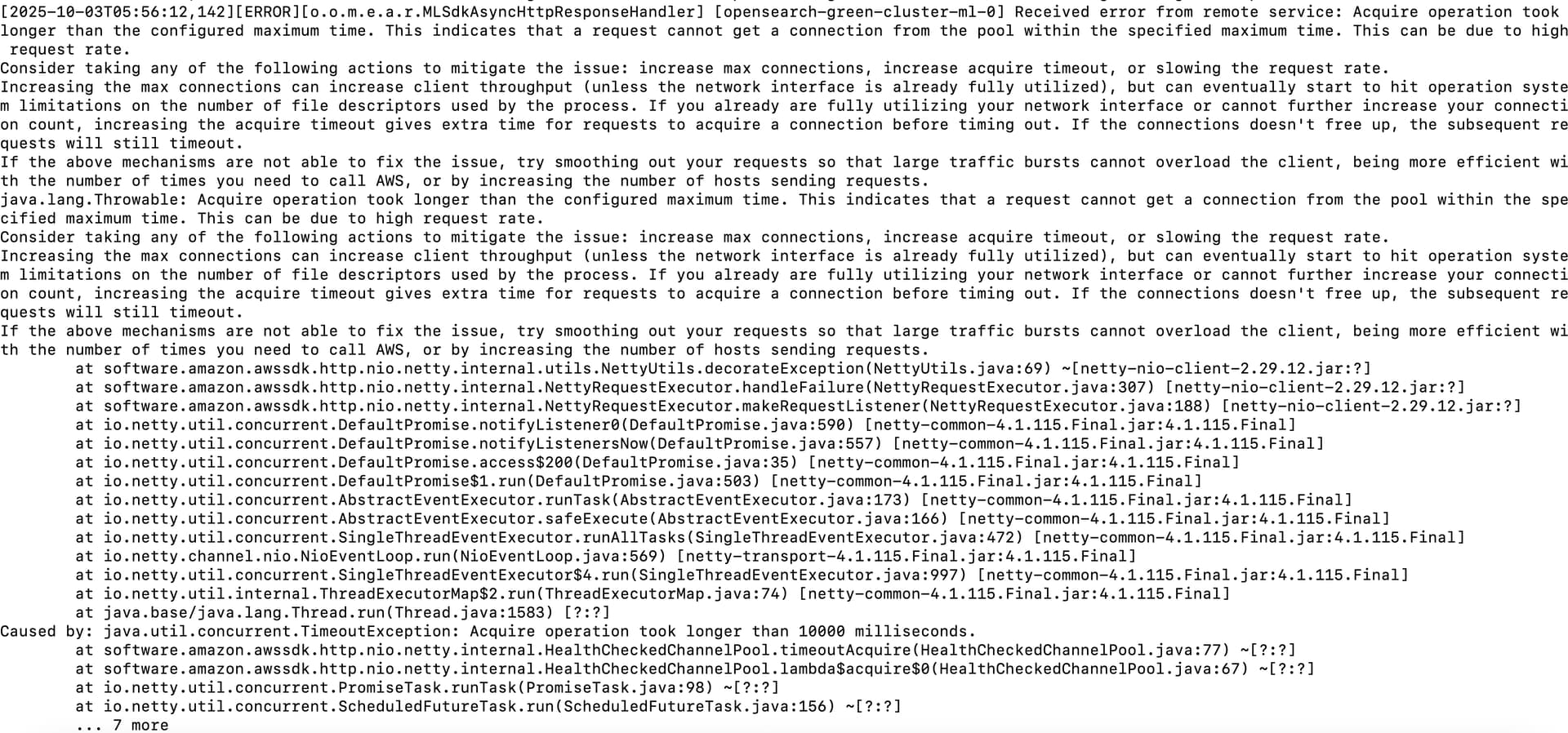
However, the connector is not able to acquire the connection with in 10 seconds - shows below error with 500 status when trying to do a test run with predict api command.

But the same endpoint is tested and works fine when independently tested on postman, so no issues with the LLM endpoint.

Tried with different client_config params increasing timeouts, connections etc., but still no luck.

Configuration:

PUT /_plugins/_ml/connectors/mUXmoJkBoHKSTJSf8rbd
{
  "name": "Llama-3.3-70B-Instruct Connector",
  "description": "Connector for Llama-3.3-70B-Instruct",
  "protocol": "http",
  "version": 1,
  "parameters": {
    "model": "meta-llama/Llama-3.3-70B-Instruct",
    "temperature": 0.7,
    "max_tokens": 500,
    "endpoint": "api-int-hawkeye-dev.carbon.com"
  },
  "credential": {
    "api_key": "<api token>"
  },
  "client_config" : {
    "read_timeout": 60000,
    "connection_timeout": 30000,
    "max_connection": 256,
    "max_retry_times": 3,
    "retry_backoff_policy": "exponential_full_jitter"
  },
  "actions": [
    {
      "action_type": "predict",
      "method": "POST",
      "url": "https://${parameters.endpoint}/llama70b/v1/chat/completions",
      "headers": {
        "Content-Type": "application/json",
        "Authorization": "Bearer ${credential.api_key}"
      },
      "request_body": "{ \"model\": \"${parameters.model}\",  \"messages\": ${parameters.messages}, \"temperature\": ${parameters.temperature}, \"max_tokens\": ${parameters.max_tokens}, \"stream\": false }"
    }
  ]
}

Relevant Logs or Screenshots:

Any help here would be appreciated. Thanks!

1 Like

@Nagpraveen Are you referring to the self-hosted OpenSearch RAG?

Could you elaborate a bit more on your design?

@pablo : I am referring to building connectors to connect to externally hosted models.

I am trying out a POC to build a connector on my opensearch which is hosted on GCP.

and the remote llm is deployed on a different on prem server.

1 Like

@Nagpraveen I was able to create the Ollama connector and run the predict API successfully. I used this GitHub documentation.

These were my steps:

  1. Configure the cluster to run Ollama with private IP addressing
PUT /_cluster/settings
{
  "persistent": {
    "plugins": {
      "ml_commons": {
        "only_run_on_ml_node": "false",
        "trusted_connector_endpoints_regex": [
          ".*$",
          "^http://ollama\\.pablo\\.local(:[0-9]+)?/.*$"          
        ],
        "model_access_control_enabled": "true",
        "native_memory_threshold": "99",
        "allow_registering_model_via_local_file": "true",
        "connector": {
          "private_ip_enabled": "true"
        }
      }
    }
  }
}
  1. Create a connector to local Ollama and local model llama3.1:8b. API key didn’t matter as I was using local model.
POST /_plugins/_ml/connectors/_create
{
  "name": "Llama-3.3-70B-Instruct Connector",
  "description": "Connector for Llama-3.3-70B-Instruct",
  "protocol": "http",
  "version": 1,
  "parameters": {
    "model": "llama3.1:8b",
    "temperature": 0.7,
    "max_tokens": 500,
    "endpoint": "192.168.1.7:11434"
  },
  "credential": {
    "api_key": "123456789123456789123456789"
  },
  "client_config" : {
    "read_timeout": 60000,
    "connection_timeout": 30000,
    "max_connection": 256,
    "max_retry_times": 3,
    "retry_backoff_policy": "exponential_full_jitter"
  },
  "actions": [
    {
      "action_type": "predict",
      "method": "POST",
      "url": "http://${parameters.endpoint}/v1/chat/completions",
      "headers": {
        "Content-Type": "application/json",
        "Authorization": "Bearer ${credential.api_key}"
      },
      "request_body": "{ \"model\": \"${parameters.model}\",  \"messages\": ${parameters.messages}, \"temperature\": ${parameters.temperature}, \"max_tokens\": ${parameters.max_tokens}, \"stream\": false }"
    }
  ]
}
  1. Create a connector to the local Ollama and cloud model gpt-oss:120b-cloud
    This will require running ollama sigin and registering the cloud model with ollama run gpt-oss:120b-cloud and creating API and Ollama keys in ollama.com

POST /_plugins/_ml/connectors/_create
{
  "name": "ollama-gpt-oss-cloud",
  "description": "Connector for Llama-3.3-70B-Instruct",
  "protocol": "http",
  "version": 1,
  "parameters": {
    "model": "gpt-oss:120b-cloud",
    "temperature": 0.7,
    "max_tokens": 500,
    "endpoint": "192.168.1.7:11434"
  },
  "credential": {
    "api_key": "75ea119c4cd9427bb240d..."
  },
  "client_config" : {
    "read_timeout": 60000,
    "connection_timeout": 30000,
    "max_connection": 256,
    "max_retry_times": 3,
    "retry_backoff_policy": "exponential_full_jitter"
  },
  "actions": [
    {
      "action_type": "predict",
      "method": "POST",
      "url": "http://${parameters.endpoint}/v1/chat/completions",
      "headers": {
        "Content-Type": "application/json",
        "Authorization": "Bearer ${credential.api_key}"
      },
      "request_body": "{ \"model\": \"${parameters.model}\",  \"messages\": ${parameters.messages}, \"temperature\": ${parameters.temperature}, \"max_tokens\": ${parameters.max_tokens}, \"stream\": false }"
    }
  ]
}
  1. Register a model with the Ollama connector and local model lama3.1:8b
POST /_plugins/_ml/models/_register
{
  "name": "ollama",
  "function_name": "remote",
  "connector_id": "0RDozpkBC2q961VMpSvy"
}
  1. Register a model with the Ollama connector and cloud model gpt-oss:120b-cloud
POST /_plugins/_ml/models/_register
{
  "name": "ollama-cloud",
  "function_name": "remote",
  "connector_id": "1BByz5kBC2q961VMkC2H"
}

  1. Test the model with _predict
POST /_plugins/_ml/models/2hBzz5kBC2q961VMVi0C/_predict
{
  "parameters": {
    "messages": [
      {
        "role": "system",
        "content": "You are a helpful assistant."
      },
      {
        "role": "user",
        "content": "Hello!What is your name???"
      }
    ]
  }
}

Response from cloud model:

{
  "inference_results": [
    {
      "output": [
        {
          "name": "response",
          "dataAsMap": {
            "id": "chatcmpl-14",
            "object": "chat.completion",
            "created": 1760124242,
            "model": "gpt-oss:120b-cloud",
            "system_fingerprint": "fp_ollama",
            "choices": [
              {
                "index": 0,
                "message": {
                  "role": "assistant",
                  "content": "Hello! I’m ChatGPT, your friendly AI assistant. How can I help you today?",
                  "reasoning": """We need to respond. The user says "Hello!What is your name??". We should greet and give name. According to system, we are ChatGPT. The user just asks name. So respond friendly."""
                },
                "finish_reason": "stop"
              }
            ],
            "usage": {
              "prompt_tokens": 73,
              "completion_tokens": 72,
              "total_tokens": 145
            }
          }
        }
      ],
      "status_code": 200
    }
  ]
}

Response from a local model:

{
  "inference_results": [
    {
      "output": [
        {
          "name": "response",
          "dataAsMap": {
            "id": "chatcmpl-679",
            "object": "chat.completion",
            "created": 1760124278,
            "model": "llama3.1:8b",
            "system_fingerprint": "fp_ollama",
            "choices": [
              {
                "index": 0,
                "message": {
                  "role": "assistant",
                  "content": """I don't have a personal name, but I'm often referred to as "Assistant" or "AI Assistant". Some people also call me "Nova" (just a nickname!). My main goal is to assist you with any questions, tasks, or topics you'd like to discuss. How can I help you today?"""
                },
                "finish_reason": "stop"
              }
            ],
            "usage": {
              "prompt_tokens": 28,
              "completion_tokens": 65,
              "total_tokens": 93
            }
          }
        }
      ],
      "status_code": 200
    }
  ]
}
Thank you for the POC on local and cloud.

This could be more of a firewall or whitelisting issue on my side while contact LLM endpoint.

I will try to deploy the model on local machine.