Can’t download generated report (XLSX) — “Insufficient permissions” despite having reports_full_access

Versions (relevant - OpenSearch/Dashboard/Server OS/Browser): 2.19.1

Describe the issue:
Users can successfully generate reports in OpenSearch Dashboards → Reporting, but when trying to download the generated XLSX or CSV file, the following error appears:

“Insufficient permissions. Reach out to your OpenSearch Dashboards administrator.”


What works:

  • Reports are successfully created and listed under Reporting → Reports.

  • The report status is Shared, and the file link (e.g., “XLSX”) appears as expected.

  • The problem occurs only when downloading the file.


Current Role Configuration:

  • The user’s backend role is mapped to:

    • reports_full_access

    • asynchronous_search_full_access

    • kibana_user

    • Custom role GISAP-index

  • GISAP-index includes:

    • cluster:admin/opendistro/reports/* actions

    • Full index permissions for .opendistro-reports-*, .opensearch_dashboards*, .kibana*

    • Action groups: read, write, index, manage, create_index

  • System indices are enabled in opensearch.yml (plugins.security.system_indices.enabled: true).


Troubleshooting Done:

  • Verified access to .opendistro-reports-* indices → OK

  • No security_exception or “no permissions for” messages in OpenSearch logs.

  • Adding kibana_all_read and kibana_all_write to .opensearch_dashboards* did not resolve the issue.

  • Reports appear under the user’s tenant; however, download still fails.


Question:
Which specific permissions (cluster or index level) are required to allow downloading report files (XLSX/CSV)?
Or is the report download action restricted to administrative users only in OpenSearch Dashboards 2.19?

Configuration:

{
  "GISAP-index": {
    "reserved": false,
    "hidden": false,
    "cluster_permissions": \[
      "cluster_composite_ops_ro",
      "cluster_monitor",
      "cluster:admin/opendistro/reports/definition/create",
      "cluster:admin/opendistro/reports/definition/update",
      "cluster:admin/opendistro/reports/definition/get",
      "cluster:admin/opendistro/reports/definition/list",
      "cluster:admin/opendistro/reports/instance/list",
      "cluster:admin/opendistro/reports/instance/get",
      "cluster:admin/opendistro/reports/menu/download",
      "indices:data/write/bulk\*"
    \],
    "index_permissions": \[
      {
        "index_patterns": \[
          "logs-*",
          "gtsr-syslog-*",
          "gtsr-beats-*"
        \],
        "fls": \[\],
        "masked_fields": \[\],
        "allowed_actions": \[
          "indices:data/read/search",
          "indices:data/read/get",
          "indices:data/read/explain",
          "indices:monitor/settings/get"
        \]
      },
      {
        "index_patterns": \[
          ".opendistro-reports-*"
        \],
        "fls": [ ],
        "masked_fields": [ ],
        "allowed_actions": \[
          "indices:data/read/search",
          "indices:data/read/get",
          "indices:data/write/index",
          "indices:data/write/update",
          "indices:data/write/delete",
          "indices:admin/create",
          "indices:admin/mapping/put"
        \]
      },
      {
        "index_patterns": \[
          ".opensearch_dashboards\*",
          ".kibana\*"
        \],
        "fls": [ ],
        "masked_fields": [ ],
        "allowed_actions": \[
          "kibana_all_read"
        \]
      }
    \],
    "tenant_permissions": [ ],
    "static": false
  }
}

Relevant Logs or Screenshots:

@Pan-Vad According to your description you’ve mapped the following roles as backend roles.

  - "reports_full_access"
  - "asynchronous_search_full_access"
  - "kibana_user"

That won’t work. The backend role for kibana user is kibanauser instead of kibana_user.
The other 2 roles must be either mapped to the user in roles_mapping.yml or internalusers.yml as OpenSearch role.

You don’t have tenant permission but this could be due to the fact that you don’t use them. Otherwise you must include kibana_all_write permission for the tenant to enable Reporting in Discovery view.

I’ve simplified your role and assigned roles and backend roles in internalusers.yml

roles.yml

GISAP-index2:
  reserved: false
  hidden: false
  cluster_permissions:
  - "cluster_composite_ops_ro"
  - "cluster_monitor"
  index_permissions:
  - index_patterns:
    - "logs-*"
    - "gtsr-syslog-*"
    - "gtsr-beats-*"
    fls: []
    masked_fields: []
    allowed_actions:
    - "indices:data/read/search"
    - "indices:data/read/get"
    - "indices:data/read/explain"
    - "indices:monitor/settings/get"
  tenant_permissions:
  - tenant_patterns:
    - "global_tenant"
    allowed_actions:
    - "kibana_all_write"
  static: false

internal_users.yml

pablo:
  hash: "$2y$12$7Uo4/fxQQD0u1bUMficVueL/tJj4VokelQqqOEuxrNFHT7/7ajqjG"
  reserved: false
  hidden: false
  backend_roles:
  - "kibanauser"
  attributes: {}
  opendistro_security_roles:
  - "reports_full_access"
  - "asynchronous_search_full_access"

Alternatively, you can assign a user to the roles with roles_mapping.yml

asynchronous_search_full_access:
  hosts: []
  users:
  - "pablo"
  reserved: false
  hidden: false
  backend_roles: []
  and_backend_roles: []
reports_full_access:
  hosts: []
  users:
  - "pablo"
  reserved: false
  hidden: false
  backend_roles: []
  and_backend_roles: []
kibana_user:
  hosts: []
  users: 
  - "pablo"
  reserved: false
  hidden: false
  backend_roles:
  - "kibanauser"
  and_backend_roles: []
  description: "Maps kibanauser to kibana_user"

Sorry, I did not fully understand. Could you please explain in more detail?

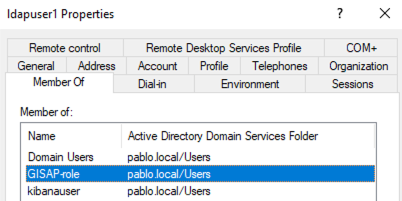
I will try to describe the situation more clearly. I created a role in OpenSearch myself, called GISAP. This role maps an AD group, for example Users. This group Users contains several individual users.

To resolve the issue with report downloads, I first modified the permissions in the custom GISAP role, then I tried mapping the Users group to other reserved OpenSearch roles to extend access rights, hoping to solve the problem.

As far as I know, kibana_user is a built-in, reserved role in OpenSearch. I would like to understand how this differs from the backend role kibanauser and how it should be correctly mapped to enable Reporting features in the Discover view.

Thank you for your clarification.

@Pan-Vad According to your comment, you use LDAP authentication. In that case, your AD user should contain kibanauser AD group.

This will be picked by OpenSearch and mapped to the kibana_user role automatically.

You’ve incorrectly used backend role mapping for two other roles, as they must be mapped as regular OpenSearch roles using AD groups as backend roles.

  - "reports_full_access"
  - "asynchronous_search_full_access"

If you want to assign your LDAP user to those groups, then you should have the following mappings in roles_mapping.yml configuration.

asynchronous_search_full_access:
  hosts: []
  users: []
  reserved: false
  hidden: false
  backend_roles: 
   - "GISAP-role"
  and_backend_roles: []
reports_full_access:
  hosts: []
  users: []
  reserved: false
  hidden: false
  backend_roles: 
   - "GISAP-role"
  and_backend_roles: []
GISAP-index:
  hosts: []
  users: []
  reserved: false
  hidden: false
  backend_roles: 
   - "GISAP-role"
  and_backend_roles: []

With these role mappings, you need only permissions for your custom index as I posted in my previous role example GISAP-index2.

Pablo, you are correct — I’m using LDAP + Active Directory for user authentication and authorization in OpenSearch.
There is an existing account called elasticsearchuser that is used for LDAP integration.

Could you please clarify if it’s possible to work without adding a separate kibanauser account or group in Active Directory?

Short summary (what has already been done):

  1. There is an AD group named GISAP (used as a backend role) with several users in it.

  2. The GISAP group is already mapped to the following roles: kibana_user, GISAP-index, asynchronous_search_full_access, and reports_full_access.

  3. The GISAP-index role includes index permissions for logs-* and gtsr-* indices, as well as several read actions.

  4. I also added the kibana_all_read action group to GISAP-index, but it didn’t help.

The report is successfully generated and appears in the Reporting menu, but when I try to download the XLSX or CSV file, I get the error: “Insufficient permissions. Reach out to your OpenSearch Dashboards administrator.”
In other words, report creation works, but downloading does not.

@Pan-Vad Do you have access to the OpenSearch logs? What’s the corresponding error message on the backend? That normally says which action is missing in the permissions.

Subject: Follow-up on Reporting Download Issue

Hello,

I have followed your instructions and monitored the logs while attempting to download a report.

  • I ran sudo journalctl -u opensearch -f on all OpenSearch nodes.

  • I also ran sudo journalctl -u opensearch-dashboards.service -f on the host where Dashboards runs.

  • While these commands were running, I attempted to download a report via the web interface.

Observation:
No error messages appeared in either OpenSearch or Dashboards logs, even though the browser returned the error:

Insufficient permissions. Reach out to your OpenSearch Dashboards administrator.

Analysis:
It seems that the error is generated by OpenSearch Dashboards itself, before any request reaches OpenSearch. This means the logs on the OpenSearch nodes do not show any entries, because the permission check fails inside Dashboards.

Conclusion:
The issue is likely related to roles, backend role mapping, or tenant permissions in Dashboards, not a server or JVM error.

Could you advise which exact permissions or role configuration must be assigned to my AD user / group (GISAP) to allow downloading reports successfully?

Thank you.

@Pan-Vad I suspect that you are hitting the bug linked to from this PR: Create the report definitions and instances indices in the system context to avoid permissions issues by cwperks · Pull Request #1108 · opensearch-project/reporting · GitHub

That PR fixes an issue in 3.2 where the .opendistro-reports-instances does not yet exist and the plugin tries to create it for the first time. Before 3.2, it didn’t properly wrap the call to make it a system-level request and instead it tries to authorize it as if the user is performing the create index request for that system index which fails.

I am surprised that you are not finding log lines corresponding to the permissions error within the backend OpenSearch log files.

I did it! :slight_smile: I removed the GISAP group from all roles, deleted all the changes I had made to the roles, and started over. Instead of custom roles, I used the built-in roles: reports_instances_read_access, reports_download_full_access, and reports_read_access. I mapped the GISAP group to the reports_full_access role, and the report started saving correctly on the host.

It seems that if a group is mapped to similar roles with different permissions—like both reports_instances_read_access and reports_full_access—the system may prioritize reports_instances_read_access as the main role. I’m not sure why exactly.

1 Like