Pretty much the same position here.
So there’s a breaking change in 3.0.0 to 3.1.0 when running on Alma 8.10, probably JAVA related.
Anyone been able to test on Alma v9?
Pretty much the same position here.
So there’s a breaking change in 3.0.0 to 3.1.0 when running on Alma 8.10, probably JAVA related.
Anyone been able to test on Alma v9?
@Crickes Alma9.6 is fine.
[pablo@localhost ~]$ curl --insecure -u admin:Eliatra123 https://localhost:9200
{
  "name" : "opensearch-node1",
  "cluster_name" : "opensearch-cluster",
  "cluster_uuid" : "J2s85ndgS5Oo3T-sr1nibA",
  "version" : {
    "distribution" : "opensearch",
    "number" : "3.1.0",
    "build_type" : "tar",
    "build_hash" : "8ff7c6ee924a49f0f59f80a6e1c73073c8904214",
    "build_date" : "2025-06-21T08:05:43.345081313Z",
    "build_snapshot" : false,
    "lucene_version" : "10.2.1",
    "minimum_wire_compatibility_version" : "2.19.0",
    "minimum_index_compatibility_version" : "2.0.0"
  },
  "tagline" : "The OpenSearch Project: https://opensearch.org/"
}
[pablo@localhost ~]$ cat /etc/*release
AlmaLinux release 9.6 (Sage Margay)
NAME="AlmaLinux"
VERSION="9.6 (Sage Margay)"
ID="almalinux"
ID_LIKE="rhel centos fedora"
VERSION_ID="9.6"
PLATFORM_ID="platform:el9"
PRETTY_NAME="AlmaLinux 9.6 (Sage Margay)"
ANSI_COLOR="0;34"
LOGO="fedora-logo-icon"
CPE_NAME="cpe:/o:almalinux:almalinux:9::baseos"
HOME_URL="https://almalinux.org/"
DOCUMENTATION_URL="https://wiki.almalinux.org/"
BUG_REPORT_URL="https://bugs.almalinux.org/"

ALMALINUX_MANTISBT_PROJECT="AlmaLinux-9"
ALMALINUX_MANTISBT_PROJECT_VERSION="9.6"
REDHAT_SUPPORT_PRODUCT="AlmaLinux"
REDHAT_SUPPORT_PRODUCT_VERSION="9.6"
SUPPORT_END=2032-06-01
AlmaLinux release 9.6 (Sage Margay)
AlmaLinux release 9.6 (Sage Margay)
[pablo@localhost ~]$
@Crickes Good news. I’ve found the way to run it in AlmaLinux8.
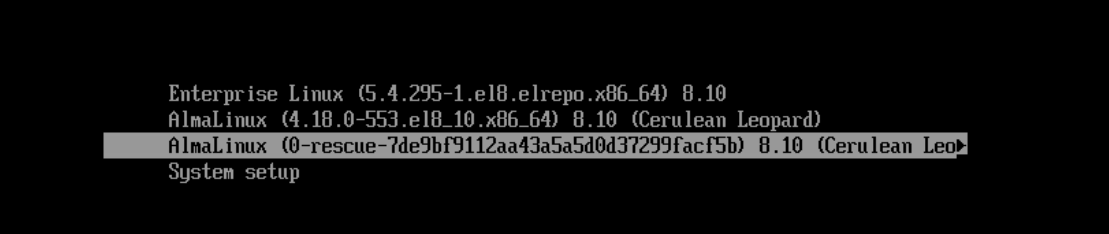
In short AlmaLinux8 is running on kernel 4.18 by default. AlmaLinux9 is on 5.x
I’ve installed kernel 5.4 on AlmaLinux8 and OpenSearch started successfully.
[root@localhost pablo]# curl --insecure -u admin:Eliatra123 https://localhost:9200
{
  "name" : "opensearch-node1",
  "cluster_name" : "opensearch-cluster",
  "cluster_uuid" : "BTKf7poWR3OosXwDZQ07og",
  "version" : {
    "distribution" : "opensearch",
    "number" : "3.1.0",
    "build_type" : "tar",
    "build_hash" : "8ff7c6ee924a49f0f59f80a6e1c73073c8904214",
    "build_date" : "2025-06-21T08:05:43.345081313Z",
    "build_snapshot" : false,
    "lucene_version" : "10.2.1",
    "minimum_wire_compatibility_version" : "2.19.0",
    "minimum_index_compatibility_version" : "2.0.0"
  },
  "tagline" : "The OpenSearch Project: https://opensearch.org/"
}
[root@localhost pablo]# cat /etc/*release
AlmaLinux release 8.10 (Cerulean Leopard)
AlmaLinux release 8.10 (Cerulean Leopard)
NAME="AlmaLinux"
VERSION="8.10 (Cerulean Leopard)"
ID="almalinux"
ID_LIKE="rhel centos fedora"
VERSION_ID="8.10"
PLATFORM_ID="platform:el8"
PRETTY_NAME="AlmaLinux 8.10 (Cerulean Leopard)"
ANSI_COLOR="0;34"
LOGO="fedora-logo-icon"
CPE_NAME="cpe:/o:almalinux:almalinux:8::baseos"
HOME_URL="https://almalinux.org/"
DOCUMENTATION_URL="https://wiki.almalinux.org/"
BUG_REPORT_URL="https://bugs.almalinux.org/"

ALMALINUX_MANTISBT_PROJECT="AlmaLinux-8"
ALMALINUX_MANTISBT_PROJECT_VERSION="8.10"
REDHAT_SUPPORT_PRODUCT="AlmaLinux"
REDHAT_SUPPORT_PRODUCT_VERSION="8.10"
SUPPORT_END=2029-06-01
AlmaLinux release 8.10 (Cerulean Leopard)
AlmaLinux release 8.10 (Cerulean Leopard)
[root@localhost pablo]# uname -r
5.4.295-1.el8.elrepo.x86_64
Pablo,
Thank you for taking the time to test and feed this information back, it really is appreciated.
The issue that I, and I suspect others have, is that we are running on managed infrastructure and we don’t get to update Kernel versions or indeed set the schedule for upgrade to newer version of the OS.
It’s great to learn that Alma9 and Alma10 have a kernel which can run the newest version of OpenSearch, but until the managed infrastructure we use has caught up and upgraded, we’re going to be stuck at OpenSearch 3.0.0., unless we can find a way of modifying the OpenSearch code/config to remove the change that causing this to fail.
Any ideas what changes in OpenSearch 3.1.x that may have caused this breaking change?
Steve
@Crickes I had impression that you’re running your AlmaLinux8 VM with VMware on-prem solution.
Unfortunately, I couldn’t find anything related in the release notes.
I get the same behaviour on the vanilla AlmaLinux8 with OpenSearch minimal binary installation.
At this point, I can only suggest filing an issue in the OpenSearch GitHub. If you do so, please share the link here for traceability.
I’ve created an issue in the OpenSearch GitHub.
I ran into the same issue with RHEL 8.10 which is an enterprise linux based on the kernel 4.18.0.
Thanks for creating an issue on GitHub @pablo !
Ran into the same issue on a Ubuntu 16.04 VM with Kernal 4.4.0
@meetshah15 According to GitHub, this issue is fixed in 3.2.0.
I’ve found another way to get OpenSearch running in AlmaLinux 8 without changing the kernel. I’ve installed Random Number Generator.
sudo dnf install rng-tools
sudo systemctl enable --now rngd
Unfortunately, it doesn’t seem to be fixed in the latest 3.2.0 version of OpenSearch.
yeonghyeon@PC:~/opensearch/prometheus-exporter$ k get po -o wide
NAME                                                             READY   STATUS    RESTARTS        AGE     IP               NODE             NOMINATED NODE   READINESS GATES
dev-opensearch-test-250821-cluster-bootstrap-0                   1/1     Running   0               9m24s   10.251.117.142   k8sosp01w05   <none>           <none>
dev-opensearch-test-250821-cluster-coordinating-0                0/1     Running   2 (2m35s ago)   9m18s   10.251.117.180   k8sosp01w05   <none>           <none>
dev-opensearch-test-250821-cluster-dashboards-6bf564655c-kn97h   0/1     Running   2 (2m25s ago)   9m6s    10.251.117.136   k8sosp01w05   <none>           <none>
dev-opensearch-test-250821-cluster-data-0                        0/1     Running   2 (2m35s ago)   9m21s   10.251.175.249   k8sosp01w08   <none>           <none>
dev-opensearch-test-250821-cluster-ingest-0                      0/1     Running   2 (2m35s ago)   9m18s   10.251.175.250   k8sosp01w08   <none>           <none>
dev-opensearch-test-250821-cluster-master-0                      0/1     Running   0               9m24s   10.251.175.241   k8sosp01w08   <none>           <none>
dev-opensearch-test-250821-cluster-ml-0                          0/1     Running   2 (2m35s ago)   9m21s   10.251.117.176   k8sosp01w05   <none>           <none>
dev-opensearch-test-250821-cluster-securityconfig-update-9246h   1/1     Running   0               9m24s   10.251.175.216   k8sosp01w08   <none>           <none>

yeonghyeon@PC:~/opensearch/prometheus-exporter$ k logs -f dev-opensearch-test-250821-cluster-ml-0
Defaulted container "opensearch" out of: opensearch, init (init), init-sysctl (init)
Enabling OpenSearch Security Plugin
Enabling execution of install_demo_configuration.sh for OpenSearch Security Plugin
OpenSearch 2.12.0 onwards, the OpenSearch Security Plugin a change that requires an initial password for 'admin' user.
Please define an environment variable 'OPENSEARCH_INITIAL_ADMIN_PASSWORD' with a strong password string.
If a password is not provided, the setup will quit.
 For more details, please visit: https://opensearch.org/docs/latest/install-and-configure/install-opensearch/docker/
### OpenSearch Security Demo Installer
### ** Warning: Do not use on production or public reachable systems **
OpenSearch install type: rpm/deb on Linux 4.18.0-553.34.1.el8_10.x86_64 amd64
OpenSearch config dir: /usr/share/opensearch/config/
OpenSearch config file: /usr/share/opensearch/config/opensearch.yml
OpenSearch bin dir: /usr/share/opensearch/bin/
OpenSearch plugins dir: /usr/share/opensearch/plugins/
OpenSearch lib dir: /usr/share/opensearch/lib/
Detected OpenSearch Version: 3.2.0
Detected OpenSearch Security Version: 3.2.0.0
/usr/share/opensearch/config/opensearch.yml seems to be already configured for Security. Quit.
Enabling execution of OPENSEARCH_HOME/bin/opensearch-performance-analyzer/performance-analyzer-agent-cli for OpenSearch Performance Analyzer Plugin
WARNING: Using incubator modules: jdk.incubator.vector
WARNING: Unknown module: org.apache.arrow.memory.core specified to --add-opens
WARNING: A terminally deprecated method in sun.misc.Unsafe has been called
WARNING: sun.misc.Unsafe::objectFieldOffset has been called by net.bytebuddy.dynamic.loading.ClassInjector$UsingUnsafe$Dispatcher$CreationAction
WARNING: Please consider reporting this to the maintainers of class net.bytebuddy.dynamic.loading.ClassInjector$UsingUnsafe$Dispatcher$CreationAction
WARNING: sun.misc.Unsafe::objectFieldOffset will be removed in a future release
Some of pods have been successfully deployed but the others haven’t. The others seem to be stuck like the above logs.
Host/Environment (please complete the following information):
OS: All hosts are worker nodes of kubernetes v1.31.4 and based on RHEL 8.10 (4.18.0 kernel)
Version: OpenSearch 3.2.0 / operator 2.8.0
@yeonghyeonKo Did you try rngd? It worked in AlnaLinux 8.
I’ve just updated the bug, but it’s in the closed state. If there won’t by any response I’ll create a new issue.
Hi @pablo , I found that two of my worker nodes in k8s have quite low entropy value. Since all pods being hosted on those nodes are stuck, I believe increasing the entropy for generating random number (ID, SSL object) might works.
However as you can see the below results, since each entropy pool of those two nodes(w008, w009) is extremely low, it’s better to restart virtualization as worker nodes for the Kubernetes cluster
[root@bt001 ~]# ssh admin@opensearchw001 "cat /proc/sys/kernel/random/entropy_avail"
3941
[root@bt001 ~]# ssh admin@opensearchw002 "cat /proc/sys/kernel/random/entropy_avail"
3945
[root@bt001 ~]# ssh admin@opensearchw003 "cat /proc/sys/kernel/random/entropy_avail"
3922
[root@bt001 ~]# ssh admin@opensearchw004 "cat /proc/sys/kernel/random/entropy_avail"
3619
[root@bt001 ~]# ssh admin@opensearchw005 "cat /proc/sys/kernel/random/entropy_avail"
3692
[root@bt001 ~]# ssh admin@opensearchw006 "cat /proc/sys/kernel/random/entropy_avail"
3961
[root@bt001 ~]# ssh admin@opensearchw007 "cat /proc/sys/kernel/random/entropy_avail"
3816
[root@bt001 ~]# ssh admin@opensearchw008 "cat /proc/sys/kernel/random/entropy_avail"
8
[root@bt001 ~]# ssh admin@opensearchw009 "cat /proc/sys/kernel/random/entropy_avail"
56
[root@bt001 ~]# ssh admin@opensearchw010 "cat /proc/sys/kernel/random/entropy_avail"
3803
@yeonghyeonKo Thanks for sharing. My findings were very similar. Low entropy was causing the OS to get stuck.
I was testing with docker and binary. In both cases on a single AlamaLinux8 node. Running rngd service increased entropy on the Linux OS.
Just sharing the other GitHub issue where you made those comments for traceability.